How to take meeting notes people actually use (free template)
- Capture decisions, actions with an owner and a date, open questions and a little context. Skip the transcript.
- Confirm decisions out loud and read actions back in the last two minutes.
- Send the notes the same day, decisions and actions first. Free template below.
Good meeting notes aren't a record of everything that was said. They're a short list of what was decided, who is doing what by when, and what's still open, written so someone who missed the meeting can act on them. Everything else is optional.
Most meeting notes fail in one of two ways. Either they try to capture everything, and end up as three pages nobody opens, or they capture too little ("discussed launch, all good") and are useless a week later when someone asks what was actually agreed.
The fix isn't writing faster. It's knowing what you're listening for.
What good meeting notes capture
If you only had room for four things, these are the ones that matter:
- Decisions. What was agreed, written as a decision: "We launch on the 14th", not "talked about launch timing".
- Actions. Every task with one owner and a date. An action without an owner is a wish.
- Open questions. What nobody could answer yet, and who will find out.
- Just enough context. The one or two facts someone who missed it needs to understand the decisions.
Notice what isn't on the list: who said what in which order, the tangent about the office move, the small talk. If it doesn't change what anyone does next, it doesn't need to be in the notes.
Before the meeting
Two minutes of preparation saves most of the work later. Write the meeting's purpose as one line at the top: what should be true when this meeting ends? Then copy in any open actions from last time, so the first few minutes can close them off rather than rediscover them.
If you're the note-taker, say so at the start. People speak more clearly, and confirm decisions out loud, when they know someone is writing them down.
During the meeting: eight habits that help
These work with a notebook. TalkGraph does most of them for you while you take part, and we've said where.
1. Listen for decisions, not words
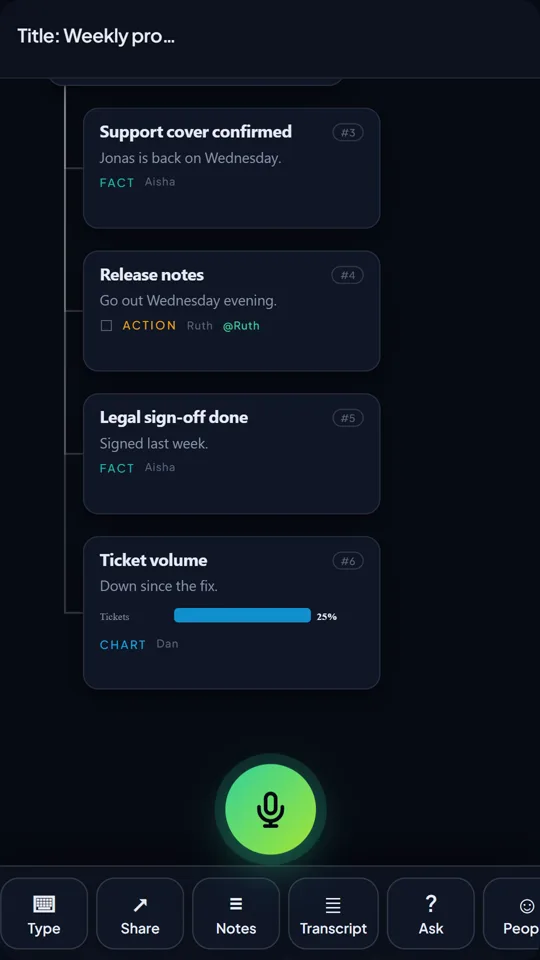
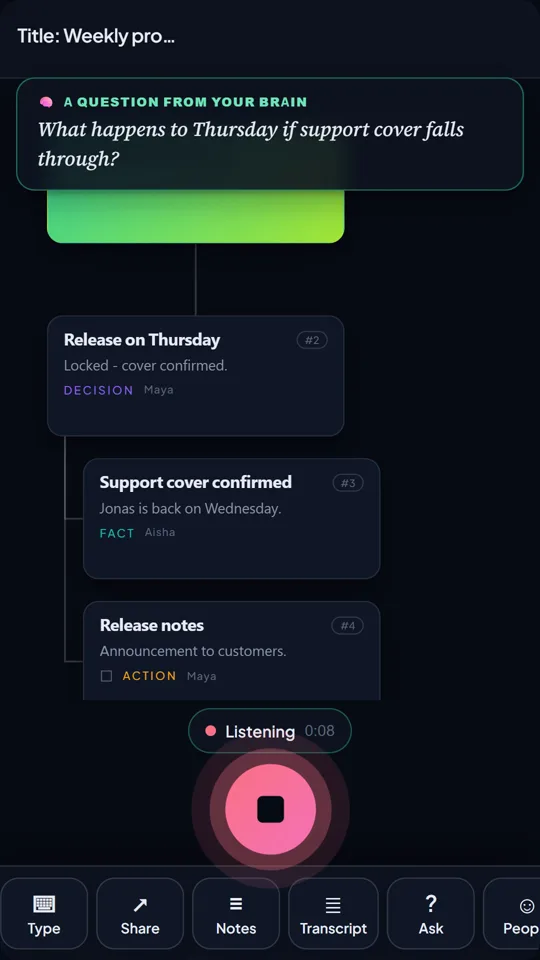
Meetings circle. The useful moment is when the circling stops and someone says "OK, so we'll…". That's the line to write down, and it's worth saying back: "So we're agreed, the 14th?" A decision confirmed out loud is a decision people remember the same way. TalkGraph lands it on the map as a decision card, with who said it.
2. Give every action an owner and a date
"Someone should check with legal" will not happen. "Ruth checks with legal by Thursday" probably will. If no one claims an action, ask who's taking it before the meeting moves on. In TalkGraph, actions become cards with an owner, and every open action from all your meetings gathers in one list.
3. Keep open questions in their own list
Questions buried in paragraphs get lost. A separate list of what's unresolved is often the most useful part of the notes, because it's the agenda for the next conversation. TalkGraph collects them as question cards on the map.
4. Don't try to write everything
Trying to capture every word stops you thinking about what's being said, and makes it hard to join in. Research on note-taking points the same way: copying words verbatim is a poor substitute for working with the ideas. Let the structure be the record. TalkGraph keeps the full transcript in the background and turns the conversation into a map of topics, decisions and actions, so you can take part instead of typing.
5. Use the speakers' words for decisions
For decisions and commitments, write close to what was actually said. It avoids arguments later about what was agreed. For everything else, your own summary is better.
6. Mark things that need a follow-up
A simple symbol in the margin, an arrow or a star, for anything that needs chasing makes the write-up afterwards much quicker.
7. Note who matters, not everyone
You don't need to attribute every comment. Do attribute decisions, commitments and anything someone might need to check with the person who said it. TalkGraph separates speakers and tags each card with who said it.
8. Leave two minutes at the end
The last two minutes are the most valuable in any meeting. Read back the decisions and actions. People correct things then, rather than by email a day later. TalkGraph's Notes write-up gives you the summary, decisions, actions and open questions to read back.
Four note-taking methods for meetings
There's no single right format. These four cover most meetings:
- Action-first. Three headings (decisions, actions, open questions) and nothing else. The best default for recurring team meetings.
- Cornell style. A narrow left column for cues and follow-ups, a wide right column for notes, a short summary at the bottom. Good for long meetings you'll need to come back to.
- Outline. Topics as headings, points indented beneath. Works when the meeting follows an agenda closely.
- Mind map. The meeting's topic in the middle, branches for each subject. Best for brainstorms and planning sessions that jump around.
After the meeting
Send the notes while everyone still remembers the meeting, ideally the same day. Lead with decisions and actions, not a narrative. A good follow-up email has a one-line greeting, two or three sentences of summary, then bulleted decisions, actions with owners and open questions. It should be readable in under a minute. TalkGraph drafts exactly this from the map in one press, ready to edit and send.
Then put the actions where they'll actually be done: your task list, the project board, the next meeting's agenda.
Meeting notes vs meeting minutes
Minutes are the formal version: an official record, usually for boards, committees and anything with legal or governance weight, approved at the next meeting. Notes are informal and for the team. Most meetings need notes. If you're not sure whether you need minutes, you probably don't.
Still prefer writing them out by hand? Fair enough (we hope to convert you soon). Here is a one-page template with space for the purpose, decisions, actions with owners and dates, open questions and context.
Questions people ask
What should meeting notes include?
Decisions, actions with an owner and a date, open questions, and just enough context for someone who missed the meeting. Leave out who said what unless it matters for a decision or commitment.
How do you take notes in a meeting while still taking part?
Don't try to write everything. Listen for decisions and commitments, write those, and keep a short list of open questions. Agree a note-taker in advance so not everyone is writing.
How soon should meeting notes be sent?
The same day if possible, while people still remember the meeting and can correct anything that's wrong.
What's the difference between meeting notes and minutes?
Minutes are a formal, approved record used for boards and committees. Notes are an informal summary for the team. Most meetings only need notes.
Can AI take meeting notes for me?
Yes. Tools like TalkGraph capture decisions, actions and open questions as you talk and draft the follow-up email, so you can take part in the meeting instead of writing it down.
TalkGraph maps what you say as you speak and asks you the next question. Free to try, no sign-up.

Klevis is the founder of TalkGraph, which he built and shipped solo. He has a First Class MSc in Computing and Information Systems, and writes about thinking, learning and tools that help people think rather than think for them.
LinkedIn →Sources
- Mueller, P. A. & Oppenheimer, D. M. (2014). The Pen Is Mightier Than the Keyboard. Psychological Science, 25, 1159-1168. doi.org/10.1177/0956797614524581
- Morehead, K., Dunlosky, J. & Rawson, K. A. (2019). How Much Mightier Is the Pen than the Keyboard for Note-Taking? A Replication and Extension of Mueller and Oppenheimer (2014). Educational Psychology Review, 31, 753-780. doi.org/10.1007/s10648-019-09468-2